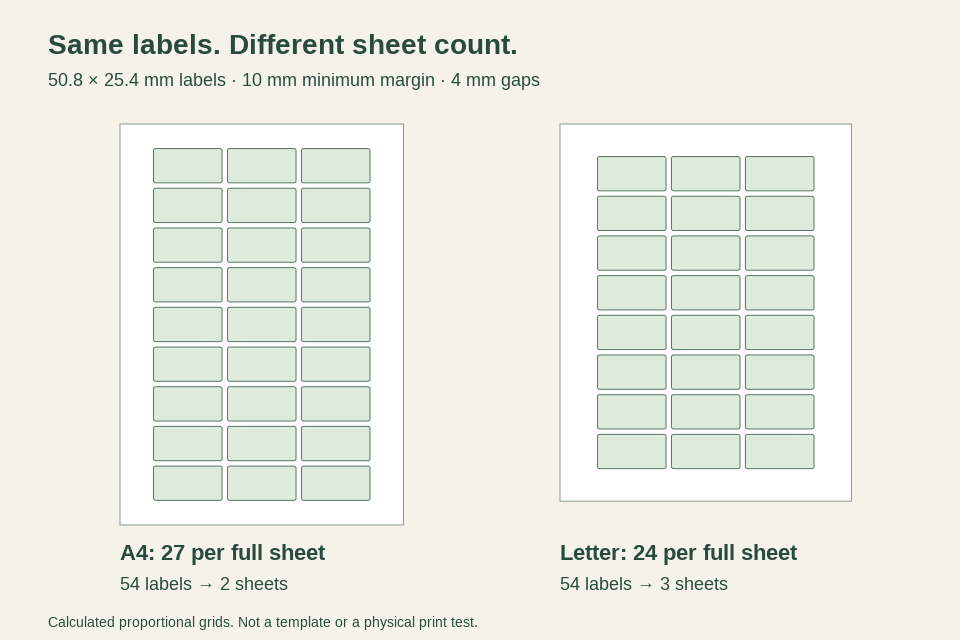
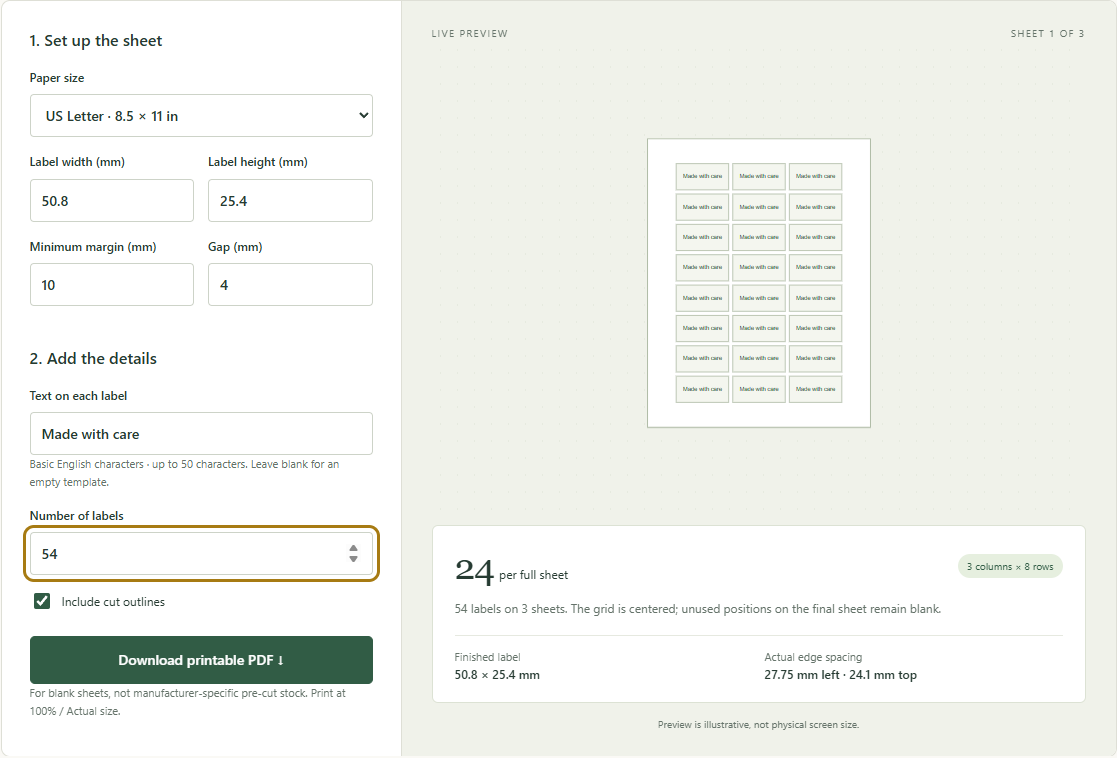
You have 54 identical labels to make, each 2 × 1 inches. Does switching from A4 to US Letter change only the unused space around them? With the settings below it changes the batch from two sheets to three: A4 fits 27 labels per full sheet, while Letter fits 24. The label dimensions stay exactly the same.
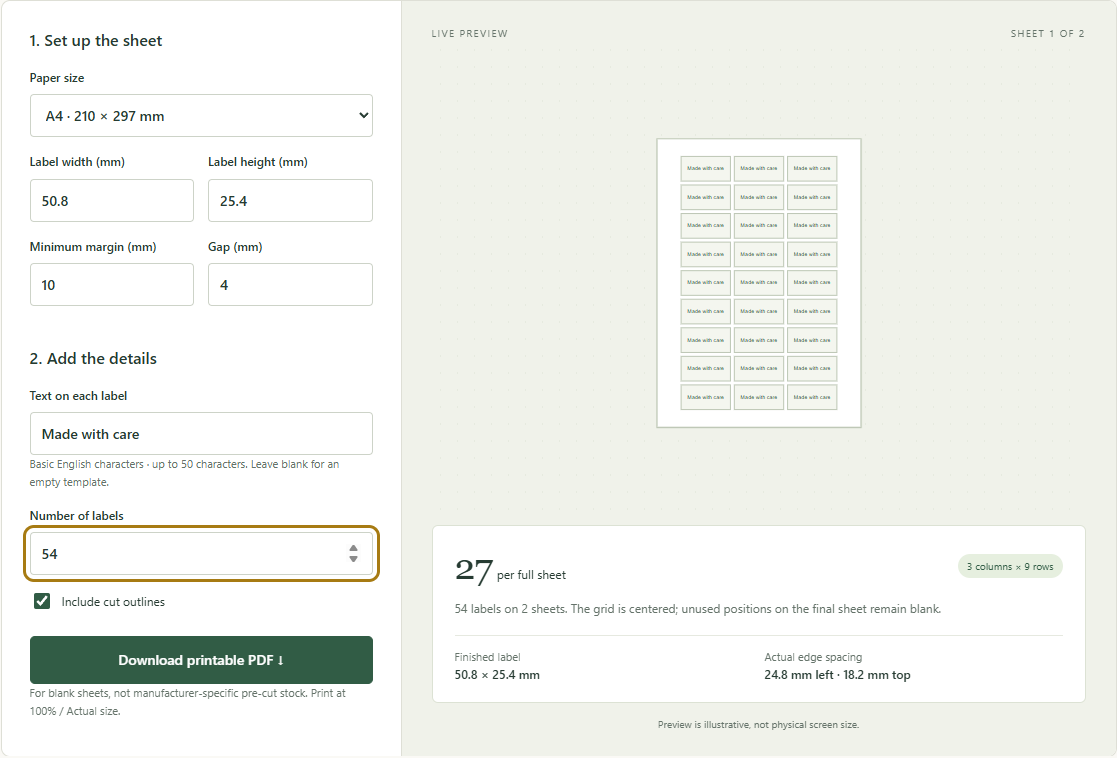
What we checked: On October 26, 2026 we entered both cases in Swetter's live layout tool, captured the actual settings and results, and independently recomputed the grid using decimal arithmetic. The diagrams and CSV describe calculated geometry. No physical printing, cutting or pre-cut-stock alignment test was performed; this article does not claim to have checked downloaded PDFs.
Keep the label fixed while changing the paper
Using 25.4 millimeters per inch, the finished rectangle is 50.8 × 25.4 mm. Enter those values directly. Rounding them to 50 × 25 changes the finished label, even if a particular grid count happens to stay the same.
Open Label & card layout and use these values:
| Control | Both runs |
|---|---|
| Label width / height | 50.8 / 25.4 mm |
| Minimum margin | 10 mm |
| Gap | 4 mm |
| Text on each label | Made with care |
| Number of labels | 54 |
| Include cut outlines | Checked |
First select A4 · 210 × 297 mm. Then change only Paper size to US Letter · 8.5 × 11 in, which the tool represents as 215.9 × 279.4 mm. This is a portrait layout with horizontal labels. The tool does not automatically rotate individual labels to search for a higher-yield arrangement.
Count gaps between labels, not outside the grid
A row of three labels needs three widths and only two gaps:
3 × 50.8 + 2 × 4 = 160.4 mm
4 × 50.8 + 3 × 4 = 215.2 mm
After reserving 10 mm on each edge, A4 provides 190 mm of width and Letter provides 195.9 mm. Both can hold 160.4 mm, but neither can hold 215.2 mm. Therefore both use three columns. The 5.9 mm wider Letter sheet produces wider outer margins in this case, not an additional column.
The general count is the whole-number part of (available dimension + gap) ÷ (label dimension + gap). Adding one gap to the available dimension compensates for the fact that there is no gap after the final label. You can also check candidate counts by multiplying dimensions directly, as above.
Find the row that Letter cannot fit
The available heights are 297 − 20 = 277 mm for A4 and 279.4 − 20 = 259.4 mm for Letter. Nine rows need:
9 × 25.4 + 8 × 4 = 260.6 mm
That grid fits on A4. It exceeds Letter's available height by 1.2 mm. Eight rows need 8 × 25.4 + 7 × 4 = 231.2 mm, so Letter falls back to eight. A4 cannot add a tenth row either: ten rows would need 290 mm, above its 277 mm allowance.
This is a threshold effect. Letter is not generally a worse choice for labels, and A4 is not guaranteed to fit more in every layout. The outcome belongs to these dimensions, this gap and this minimum margin. Our gap-threshold case isolates a different change: losing a column when the gap grows by one millimeter.
Explain the actual outer margins
The 10 mm input is a minimum, not a promise that the first label starts exactly 10 mm from the sheet edge. Swetter centers the complete grid in the page. The remaining horizontal space is split equally, and so is the vertical space.
| Result | A4 | Letter |
|---|---|---|
| Grid | 3 × 9 | 3 × 8 |
| Grid width | 160.4 mm | 160.4 mm |
| Grid height | 260.6 mm | 231.2 mm |
| Left and right spacing | 24.8 mm each | 27.75 mm each |
| Top and bottom spacing | 18.2 mm each | 24.1 mm each |
| Full-sheet capacity | 27 | 24 |
For example, (279.4 − 231.2) ÷ 2 = 24.1 mm on Letter. A surprisingly large top margin is consistent with the model: the missing row leaves more spare space, which the tool distributes around the eight-row grid.
Translate capacity into a batch decision
For 54 labels, A4 uses 27 + 27, filling two sheets. Letter uses 24 + 24 + 6, requiring three sheets. The third Letter sheet has 18 unused positions. This does not mean those positions contain extra printed labels: quantity limits the number generated. Nor does the tool reuse partially consumed label stock or let you choose a starting position on a pre-cut sheet.
The comparison is about blank sheets and the same finished label size. Changing the paper preset and then applying Fit to page while printing would introduce a separate scaling decision. If exact physical size matters, match the paper and inspect an unscaled first proof before cutting. A first-sheet measurement can check what the printer actually produced; the screenshots here cannot.
A useful follow-up calculation
Could Letter fit nine rows without shrinking the labels? With the same 4 mm gap, it needs a minimum margin no greater than (279.4 − 260.6) ÷ 2 = 9.4 mm. That is a mathematical fit threshold, not a claim that your printer or material supports it. At that threshold the ninth row fits; with the original 10 mm margin it does not. Check your actual printable area before choosing it.
Download the independently checked comparison CSV or open the proportional grid diagram. Keep the original four geometry inputs with your print instructions. If you change one, recompute both the sheet capacity and the actual edge spacing before treating an old recipe as reusable.