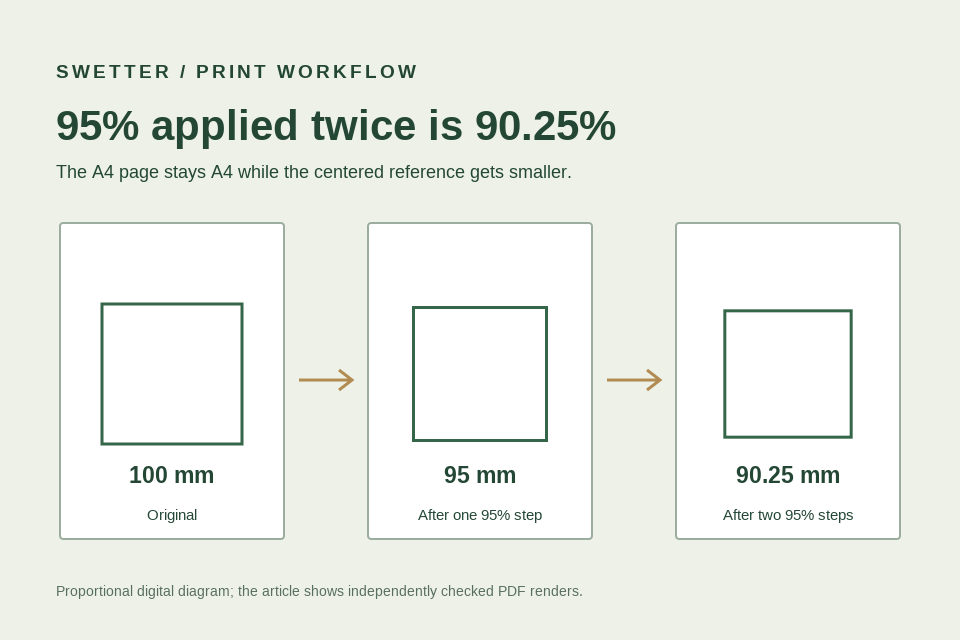
A design file already has a 100 mm reference reduced to 95 mm. You select another 95% setting in the print dialog, expecting the result to stay at 95 mm. It will not: 95 mm × 0.95 = 90.25 mm. The two steps multiply. They do not replace each other.
We tested the arithmetic with Swetter's existing 100 mm A4 reference PDF. Two derived PDFs show its vector square after one and then two 95% digital transformations. We also ran the live Paper scaling calculator with an A4-to-A4 setup that returns exactly 95%.
Evidence and limit: On October 22, 2026, we captured the actual calculator result. We digitally transformed the existing Swetter PDF and independently inspected all three files' A4 page boxes and square-outline coordinates, then rendered those files at the same resolution. The derived PDFs are controlled digital models, not files printed by a driver. No paper printing or ruler measurement was performed. The calculator does not inspect PDF contents or know a particular printer's margins.
Get a reproducible 95% result
Open Paper scaling calculator and enter these values:
| Control | Value |
|---|---|
| Original paper | A4, 210 × 297 mm |
| Destination paper | A4, 210 × 297 mm |
| Minimum margin | 5.25 mm |
| Scaling behavior | Fit — keep the whole page |
| Rotate source page | Off |
The 5.25 mm is a chosen planning allowance, not a measured printer specification. It leaves a modeled area of 199.5 × 286.5 mm. The width ratio is exactly 199.5 ÷ 210 = 0.95; the height ratio is about 286.5 ÷ 297 = 0.96465. Fit takes the smaller one, so the tool reports 95% and a scaled full page of 199.5 × 282.15 mm. It also says “Whole page fits.”
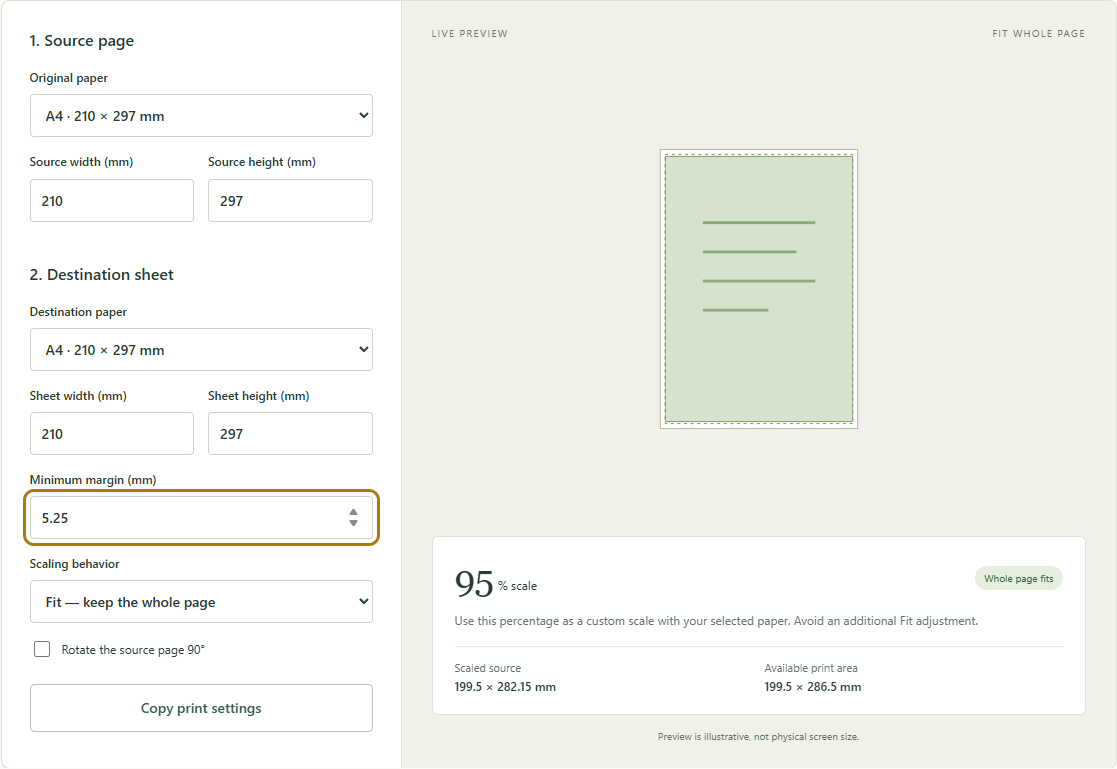
At 95%, the modeled A4 page is centered with 5.25 mm at each side and 7.425 mm at the top and bottom. The top space exceeds the entered minimum because width, rather than height, limits the scale. The result describes a whole-page resize; it says nothing about whether the artwork inside that page was previously reduced.
Inspect the 100 mm square through both steps
The original download is a one-page A4 PDF with a centered vector square. Its outline path is 100 mm wide and 100 mm high. To model a pre-scaled source file, we applied a 95% vector transformation around the page center while keeping the PDF's A4 page box unchanged. We applied that transformation a second time for the final comparison file.
These are equal-sized views of the central 130 × 130 mm region of each PDF. Each view came from a Poppler render of the linked file, cropped at the same coordinates and resolution. The visible outline moves inward because its actual vector dimensions change; the images are not paper photographs.



| Digital file | Cumulative scale relative to the original | Checked square width | PDF page box |
|---|---|---|---|
| Original reference | 100% | 100 mm | A4, 210 × 297 mm |
| One 95% transformation | 95% | 95 mm | A4, 210 × 297 mm |
| Two 95% transformations | 90.25% | 90.25 mm | A4, 210 × 297 mm |
The square outline path in each PDF was independently extracted and checked within 0.001 mm of those sizes and the centered coordinates, allowing for PDF rounding. The page box remains A4 in all three files. This matters: merely seeing “A4” in a document's properties does not prove that the content within it is still 100 mm. The later Fit calculation uses page geometry; it cannot discover the earlier content transformation.
Multiply the factors, then compare the loss
One step:   100 mm × 0.95        = 95 mm
Two steps:  100 mm × 0.95 × 0.95 = 90.25 mm
Combined:   0.95 × 0.95         = 0.9025 = 90.25%
Relative to the original reference, the combined loss is 9.75 mm, or 9.75%. It is not a 10% loss: the second 5% reduction acts on the already smaller 95 mm shape, removing 4.75 mm. For a 50 mm element, the same factors would produce 45.125 mm. The arithmetic depends on the actual factors applied, not on what two settings happen to be called in different applications.
Our example deliberately uses two exact 95% digital factors. A real print application's automatic Fit may choose a different ratio from its selected paper, printable area and driver. Swetter's 5.25 mm value is a model input, so do not assume a specific printer will reproduce the 90.25 mm outcome.
Find which step already changed the artwork
If size matters, start with a known-size item in the source file. For this case, download the original 100 mm reference and compare it with the one-step 95 mm file. Both report an A4 page box, but the vector outlines differ. The two-step 90.25 mm file shows the cumulative result as another digital model. The calculation record lists the extracted bounds.
When you move to the real job, decide where the scale should be applied once. If the artwork is already correctly sized inside an A4 PDF, select an unscaled setting in the print application when the intended page and paper match, then inspect its preview. If you deliberately use a 95% Fit setting, keep the source artwork at its original size and verify that no export or driver stage repeats the reduction. The reciprocal calculation 100 ÷ 95 ≈ 1.05263 describes how much 95 mm would have to grow to reach 100 mm, but blindly entering 105.263% can move other content beyond the usable area; it is a diagnosis, not a universal correction.
Finally, make a single physical proof of the actual document and measure its known feature in both directions. The first-sheet reference walkthrough shows how to record that measurement. For the difference between a one-time Fit and Fill decision on mismatched paper, see the A4-to-Letter comparison. Neither earlier article follows artwork that was reduced before a later print setting; that is the extra check this case isolates.
Reproduce the digital comparison
- Original A4 PDF: 100 mm square
- First derivative: 95 mm square, A4 page
- Second derivative: 90.25 mm square, A4 page
- Checked square coordinates and sizes (CSV)
The two derivative PDFs are constructed digital demonstrations, not outputs from a specific printer or PDF application's Fit command. No physical printing was performed.