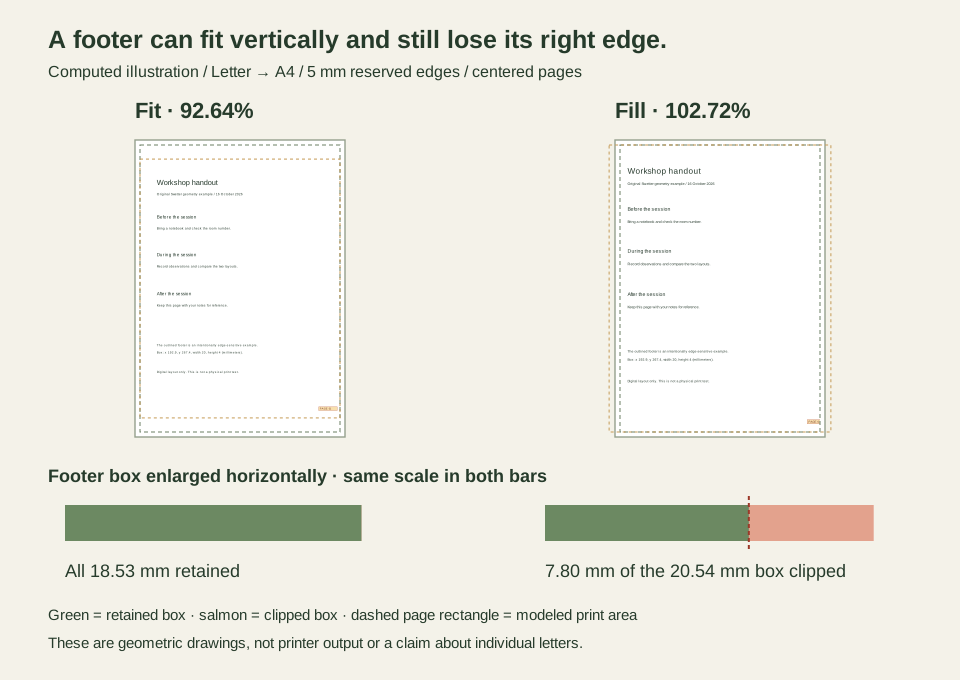
An A4 sheet is taller than US Letter, so a footer near the bottom might seem safe when you change paper. The catch is width. A centered Letter page enlarged to fill A4 can lose part of a footer at the right edge even while leaving space below it.
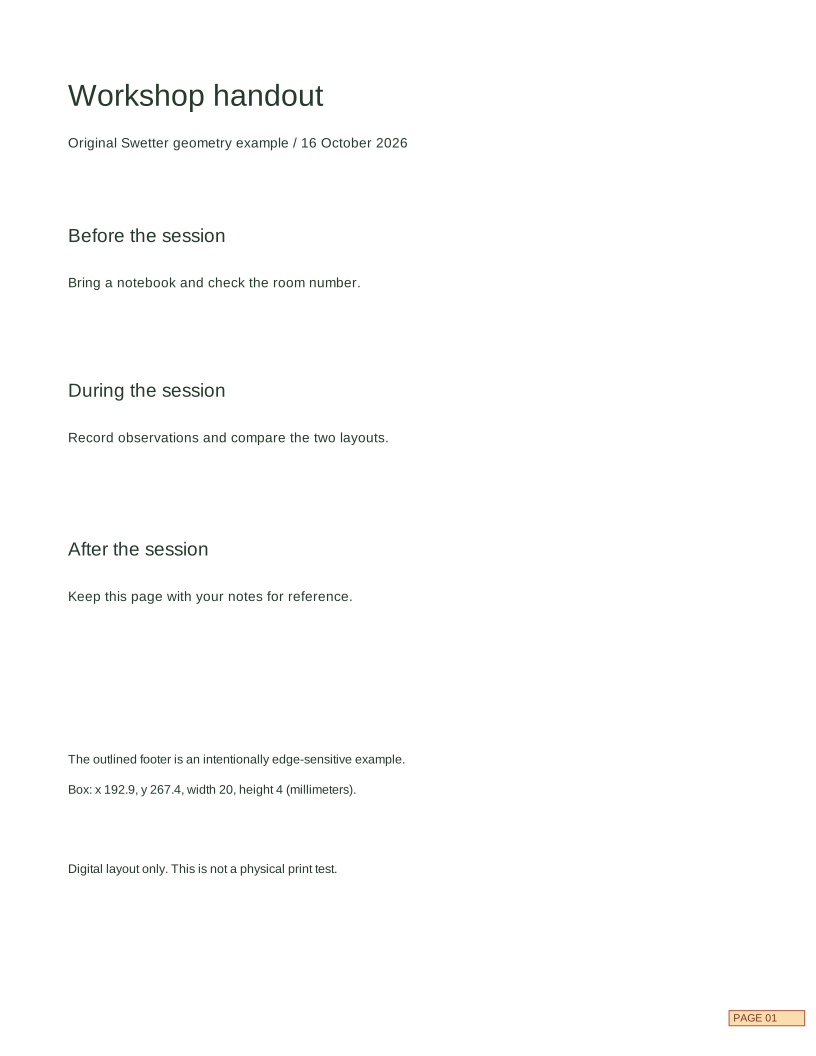
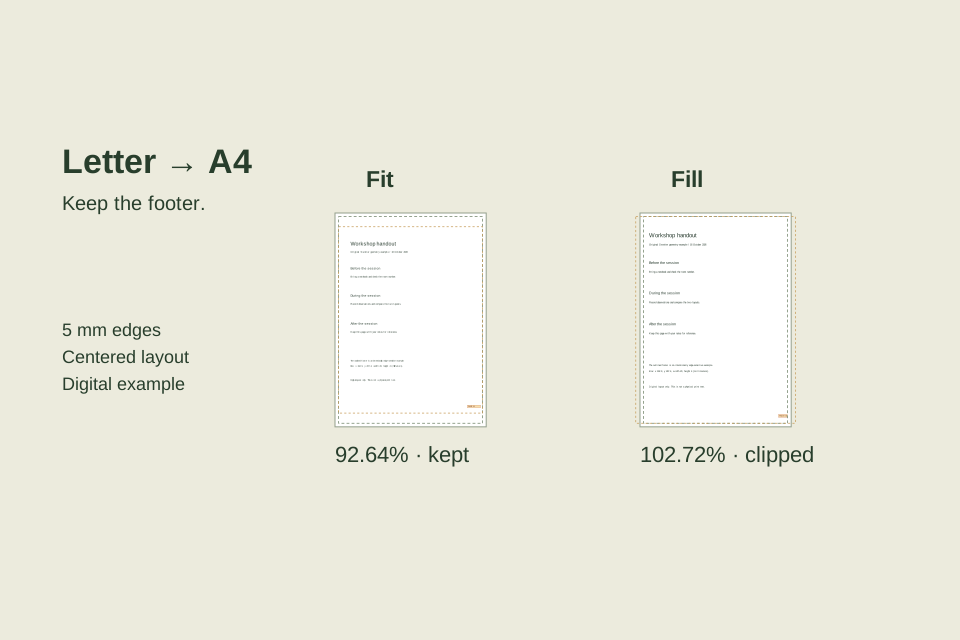
For this example, we made a simple Letter workshop handout with a measured footer box. With a 5 mm reserved margin, 92.64% Fit keeps the whole page. 102.72% Fill clips about 7.80 mm from the right of our footer box. Here is how to reproduce the calculation and tell document whitespace apart from the printer allowance.
Evidence and limits: the two settings screenshots are actual Swetter browser runs from October 16, 2026. We independently checked the geometry using decimal calculations. The handout and comparison drawings are original constructed examples, not an uploaded customer's document or a printer preview. No physical printing was performed. Swetter's calculator models a centered page with equal margins; it does not inspect a PDF or read your printer's printable area.
Set up a footer you can measure
Our source is portrait US Letter, 215.9 × 279.4 mm. The footer box is 20 mm wide and 4 mm high, placed 3 mm from the right edge and 8 mm from the bottom edge. Its coordinates, measured from the page's top-left corner, are x = 192.9 mm and y = 267.4 mm. The box contains “PAGE 01,” but the calculations below track the box boundary, not the exact outlines of the letters.
The destination is portrait A4, 210 × 297 mm. Reserving 5 mm on all four sides leaves 200 × 287 mm. That rectangle runs from x = 5 to 205 mm and y = 5 to 292 mm on the destination sheet. It is the clipping boundary in this example.
Download the original Letter handout (SVG) · Download the checked measurements (CSV)
The SVG declares a 215.9 × 279.4 mm page. It is an editable digital example, not a calibrated print. The CSV includes Fit, Fill and a separately calculated 100% case, with positions measured in millimeters on the A4 sheet.
Open the Paper scaling calculator. Choose US Letter for Original paper, A4 for Destination paper and 5 for Minimum margin. Leave rotation unchecked. Do not swap the source and destination: the A4-to-Letter example loses height in Fill mode, while this direction loses width.
Fit keeps the page, with extra space above and below
Select Fit — keep the whole page. The actual result is 92.64%, with a scaled source of 200 × 258.82 mm and the message “Whole page fits.”
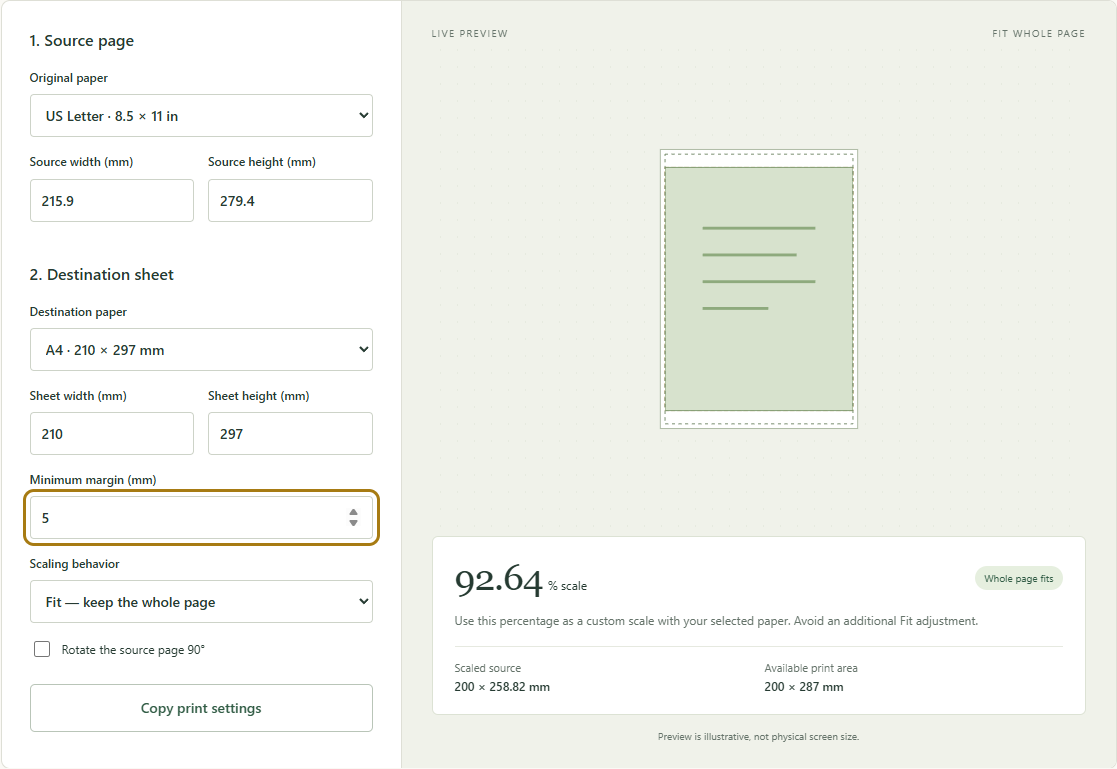
Fit takes the smaller available-to-source ratio: min(200 ÷ 215.9, 287 ÷ 279.4) = 0.92635479…. Width sets the limit. The height ratio is greater than 1, but using it would make the page too wide.
Centered on A4, the scaled source starts 5 mm from the left and 19.09 mm from the top. The bottom page-edge space is also 19.09 mm. This is larger than the 5 mm minimum because the two page shapes have different proportions.
The footer adds its own internal whitespace. Its right edge lands at about 202.22 mm, inside the x = 205 mm clipping boundary. Its bottom edge is about 26.50 mm from the sheet's bottom: 19.09 mm of placement space plus 8 mm × the unrounded scale. The entire box survives in this model.
Fill clips the sides, not the bottom
Change only Scaling behavior to Fill — crop any overflow. The result becomes 102.72% and the scaled page becomes 221.77 × 287 mm. The tool warns of 21.77 mm total horizontal overflow, with zero vertical overflow.
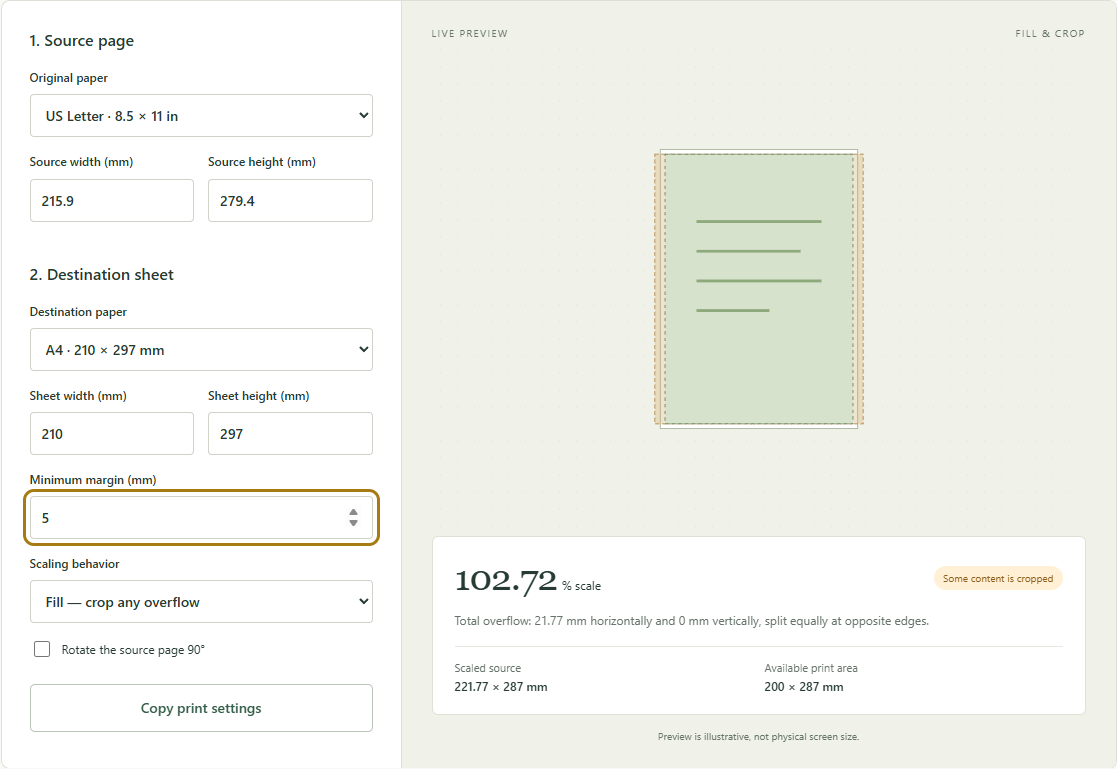
Fill uses max(200 ÷ 215.9, 287 ÷ 279.4) = 1.02720114…. Centering splits the 21.77 mm overflow between the two sides: about 10.89 mm of scaled page per side. Dividing that by the scale gives 10.60 mm per side in original Letter-page coordinates.
Our footer is only 3 mm from the original right edge, so it enters that trimmed strip. Its scaled right edge reaches 212.80 mm on the destination, beyond the available-area boundary at 205 mm. The difference is 7.80 mm. The whole scaled footer is 20.54 mm wide, so that loss is substantial even though the bottom of the box is still 13.22 mm from the bottom of the sheet.
Compare 100% before assuming it solves the problem
Printing at 100% preserves document dimensions, but does not make a wide source fit a narrower available area. Under the same centered 5 mm model, the 215.9 mm Letter page exceeds the 200 mm available width by 15.9 mm. Each side loses 7.95 mm of source space. The footer's 3 mm inset is too small: 4.95 mm of its right side is clipped.
| Centered A4 result, 5 mm reserved edges | Fit | 100% | Fill |
|---|---|---|---|
| Scale shown or specified | 92.64% | 100% | 102.72% |
| Scaled page width | 200.00 mm | 215.90 mm | 221.77 mm |
| Scaled page height | 258.82 mm | 279.40 mm | 287.00 mm |
| Total horizontal overflow | 0 mm | 15.90 mm | 21.77 mm |
| Footer width clipped at right | 0 mm | 4.95 mm | 7.80 mm |
| Footer bottom to sheet bottom | 26.50 mm | 16.80 mm | 13.22 mm |
| A source 100 mm line becomes | 92.64 mm | 100.00 mm | 102.72 mm |
The 100% column is a separate calculation, not a third calculator mode or a measured print. Positions use the exact factors; the displayed figures are rounded. For ordinary reading copies, Fit is the useful starting point here. For a scale-sensitive template, the reduced line length is a reason to use suitable paper or revise the source layout instead.
Separate document whitespace from the printer allowance
There are three different distances in this example. The 3 mm and 8 mm belong to the original handout and scale with it. The 5 mm is our chosen allowance on the destination sheet and does not scale. The 19.09 mm top space in Fit comes from centering a shorter page on a taller sheet; it is not an additional printer requirement.
Increasing the calculator's margin reduces the available rectangle. It does not move the footer inward within the source document. Conversely, moving the footer in your editor changes the source content but does not alter the printer's non-printable area.
If you must keep the Fill scale, this model requires every part of the footer box to be more than 10.60 mm from either original side edge. Moving its right inset from 3 to 12 mm would clear the calculated boundary, but only by about 1.44 mm on the output. That is a geometric allowance, not a tested tolerance for your printer. Check all other edge content too. Reformatting the editable document for A4 may be a better way to preserve readable type and generous margins; inspect the resulting page breaks and footer placement after reflow.
The 5 mm assumption is not a universal printer margin. If the device requires larger or unequal edge allowances, the centered, equal-margin example will not describe its output exactly.
Transfer one scale, then check one sheet
Use Copy print settings to retain the calculated destination, margin, mode and percentage. For this handout's reading copy, start with A4 and the Fit result, then inspect the actual document in your printing application's preview. Check the lower-right footer as well as the top and bottom edges.
In Acrobat, Fit uses the selected paper's printable area, while Custom Scale applies the percentage you enter. Its automatic Fit can therefore differ from our manually reserved 5 mm area. These meanings are documented in Adobe's page sizing instructions. Use one intentional scaling step; inspect the result before adding any further resizing in the application or driver.
The tool rounds Fit to 92.64%. Entering that rounded value produces a page about 200.01 mm wide rather than exactly 200 mm. Our footer is comfortably inside the model, but do not treat a rounded percentage as a guarantee for a mark directly on a boundary.
Before running the batch, print a single page and check that the whole footer is visible, the sheet is centered as expected and the text is readable. If a known-length line matters, measure it too; the first-sheet reference walkthrough explains how to separate scale from placement. Those paper checks remain for you to perform with your document and printer.